Docs / Set it up
3. Buy a Telnyx phone number
The number you buy is the one your building's intercom will call. Here is how to search for one and what to expect.
This is your Knock number: the phone number your building will dial instead of a person's phone.
Buy it
- In the Telnyx portal, open the menu (top left), then Phone Numbers under Numbers.
- Press Buy number.
- Set Country to where you live.
- Under Features, choose Voice (Knock only needs voice).
- Set Type to Local.
- Pick an Area code you like, or search by the digits you want.
- Press Search Numbers, add one to the cart and check out.
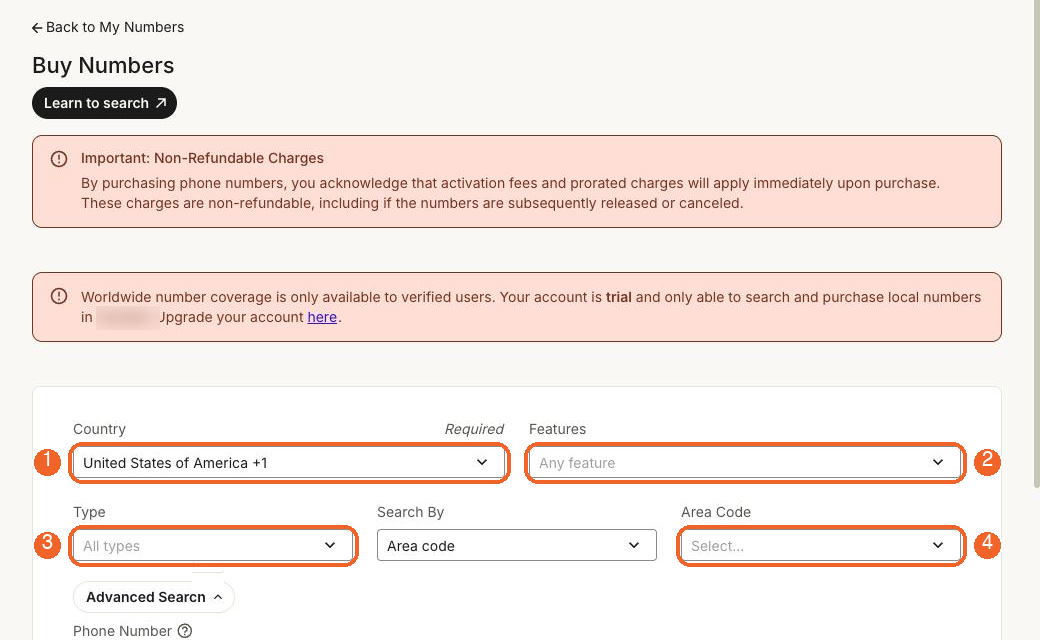
Charges are not refundable
Telnyx warns at the top of this page that activation fees and prorated charges apply immediately and are non-refundable, even if you release the number. A local number is about $1 a month, but think before you click.
Seen in the wild
On a Trial account the page said: "Your account is trial and only able to search and purchase local numbers in [your country]." The country on your account decides which numbers you can buy, so if you signed up in Canada you'll be offered Canadian area codes. A Trial account also allows only one number. Worldwide numbers open up after you upgrade.
Write the number down
Telnyx shows numbers like +1 415 555 0123. Knock wants it in international format with no spaces:
+14155550123
A plus sign, the country code, then the digits. No dashes, brackets or spaces. This is TELNYX_NUMBER later.
Seen in the wild
A stray comma pasted after the number (+14155550123,) showed up on screen and would have broken the caller ID for backup calls. Knock now repairs small paste mistakes like that, but type it cleanly anyway.
What you should see
Open Phone Numbers again. Your number appears with status Active. The Connection/Application column is empty for now; you will fill it in on the next page.